Each technician will have a work list containing the submittals currently assigned to them. To view a technician’s work list, choose their username from the dropdown menu and select either All, Active, or Archived forms.
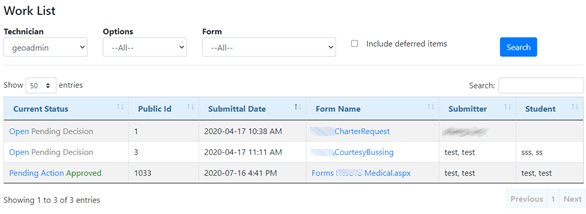
Assigned submittals will be displayed with their Current Status, Public ID, Submitted Date, Form Name, and the name of the individual that submitted the form. To open and/or edit a particular submittal, click on it under Current Status.
Current Status - Displays the current Step & Status of the submittal.
Public ID - The unique identifier of the submittal itself.
Submittal Date - The date and time at which the form was submitted.
Form Name - The internal name of the original form.
Submitter - Name of the submitter of the form.
Student - Name of the student the form applies to.
As a technician, this is where you can organize and sort your day of work. You can sort your way through the submittal date by working from old forms to newer forms or by working through current status and tackling any forms that are open.